
Guides
Alliances
Public teams on Rtp.Fun — share calls with your members, launch together from a launch room, and climb the alliance board.

How the alliance score is weighted
- Trading profit
- 30%
- 7-day volume
- 25%
- Active members
- 20%
- Call quality
- 15%
- Launches
- 10%
Find an alliance
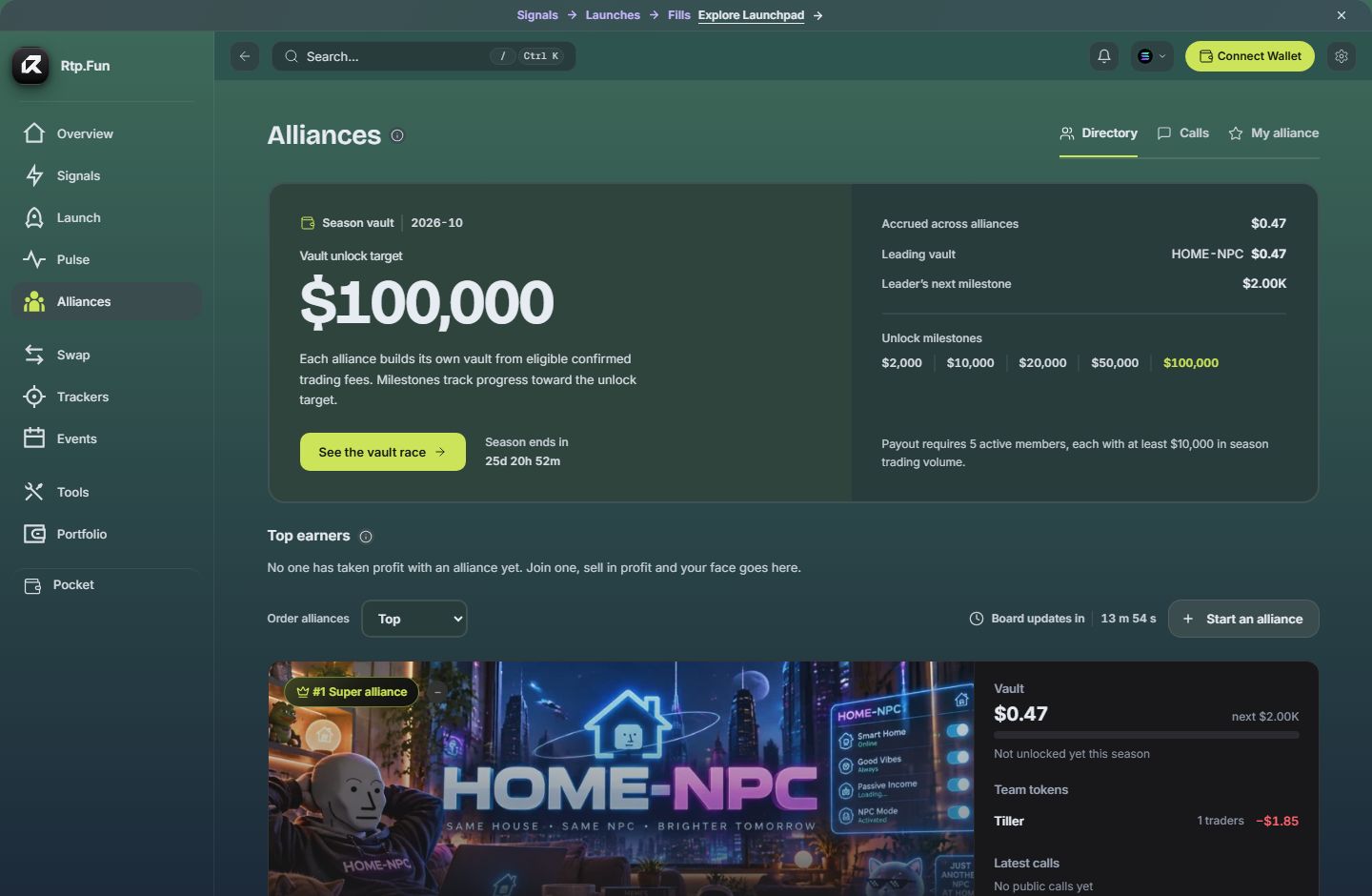
Section titled “Find an alliance”Before October 15, 2026 at 00:00 UTC, the Directory is for browsing and joining. Alliances are Unranked; use Newest or Members to browse. Competition earnings, score, Rising and Super/Premium places are not counted or assigned before opening. Existing members, calls and launch content remain available.
After opening, the Directory ranks scored alliances by their score. The top ranked alliance holds the Super seat, the next three hold the Premium seats, and the rest follow on the leaderboard. Use Order alliances to choose Top (score), Rising (eligible members who joined this week), Vault race (current season vault balance) or Newest. An alliance without a counted snapshot remains Unranked; list order is not proof of a competition place. Seats are earned; none are paid placement.
Every alliance has its own page: open it from its name. It shows the banner, avatar and badge its owner chose, its total earnings and score, how it has grown over the last 30 days, its pinned and latest calls, and who runs it. Share the page’s link to invite people.
To join a listed alliance, sign in, open the alliance from the directory, read and accept its rules, then choose Join alliance. You can belong to one alliance at a time. A listed alliance does not require an invitation. After joining, its calls appear in Signals under Calls.
Season vault
Section titled “Season vault”The rewards campaign is scheduled to open on October 15, 2026 at 00:00 UTC. Before that instant, the season panel describes the upcoming campaign. Fees confirmed before the start do not fund its rewards. A target, countdown or scheduled season is not an active reward or a payout.
Once the campaign opens, each alliance’s vault tracks eligible confirmed trading fees recorded after the start. The large Vault unlock target is a milestone, not money already earned. Accrued across alliances and Leading vault are recorded balances when available; an unavailable amount should not be read as zero.
The season panel publishes the applicable milestones, end time and requirements for active members and qualifying volume. Check those rules when the campaign opens. The vault ledger records accrual and unlocks; an unlocked ledger amount is not proof that a transfer has been paid to a Wallet.
Earnings and score
Section titled “Earnings and score”Total earnings combines the recorded realized profit and loss of members’ eligible Rtp.Fun Wallet positions with unlocked vault rewards for the season. Profit and loss can be negative. Incomplete position data limits the figure; it is not a guaranteed return.
- Only realized profit counts: a position bought and then sold. Open positions and wallet balances going up or down are not earnings.
- Only positions opened at or after competition opening and after a member joined count, so older wallet positions add nothing to the competition.
- A trade bought and sold within a minute is left out.
The score decides the board. The backend scales each non-negative part using log(1 + value), compares it with the best alliance’s value, then applies these weights. A part with no qualifying activity contributes zero:
| Part | Weight |
|---|---|
| Trading profit | 30% |
| Rtp.Fun volume, last 7 days | 25% |
| Active members (members who traded this week) | 20% |
| Call quality (how called tokens moved since the call, from at least 5 calls) | 15% |
| Launches from alliance rooms, plus twice the number of graduations | 10% |
For ranking, a member’s profit and volume contribution is capped at 30% of the corresponding uncapped total. This cap affects the score inputs, not the displayed realized earnings. Check the displayed update time; ranking data is a recorded snapshot rather than a continuous price feed.
Competition volume and judged-call windows never extend before the October 15 opening. Launch score uses confirmed receipts from opening onward. Preparatory calls stay visible but cannot break a competition-ranking tie. Historical execution and fee records are retained; a delayed observation does not turn an execution confirmed before opening into an eligible reward contribution.
Start your own
Section titled “Start your own”Choose Start an alliance in the Directory, or open My alliance, to create an alliance and give it a name. As its owner you can list it in the directory for anyone to join, or share its ID and invitation code with the people you choose.
On your alliance’s page, Manage opens its settings: upload an avatar and a banner, give it a badge of up to 16 characters in one of six colours, and edit its name and description. You can name up to two admins. Admins can change how the alliance looks, pin up to three calls and remove members; only the owner lists the alliance, names admins or removes an admin.
Only the owner can enable Stealth presentation. Public visitors can still see the alliance name, avatar, total member count and recent membership growth. Individual profiles, token activity, calls and detailed performance are hidden. Members retain access to their internal alliance board. This setting changes public presentation; it does not make on-chain transactions private.
A call is a short note, usually about a token. Open Alliances, then choose Calls to follow the conversation. When a call names a token, the row shows that token’s state now: where it stands on its launch curve or that it has graduated, its market cap and its 24-hour change.
Calls use Alliance visibility by default. Members of a listed alliance can choose Community to share a call publicly. Your alliances’ calls also appear in your Signals feed under Calls.
Each member’s standing in the alliance comes from their calls: how far the tokens they called have moved since they called them.
Launch rooms
Section titled “Launch rooms”A launch room is how an alliance organises a launch on Solana. A room has 2 to 4 seats; once every seat is filled, the room’s opener can review and confirm the launch. Filling the room does not send a transaction by itself. Its creator can attach the room to the alliance so members can find it.
Trading rewards go to the opener’s launch wallet. The number of seats does not divide those rewards. See Launch a coin.
Good to know
Section titled “Good to know”- Sign in to join, create, read calls or open a room.
- A call is one member’s view, not advice. Check a token before you trade it.
Related: Signals and Trackers · Launch a coin · Roadmap