
Guides
Trade
The token page — a live chart, who is trading, holder and security checks, and a one-tap order panel with presets, Anti-MEV, slippage and priority fees.

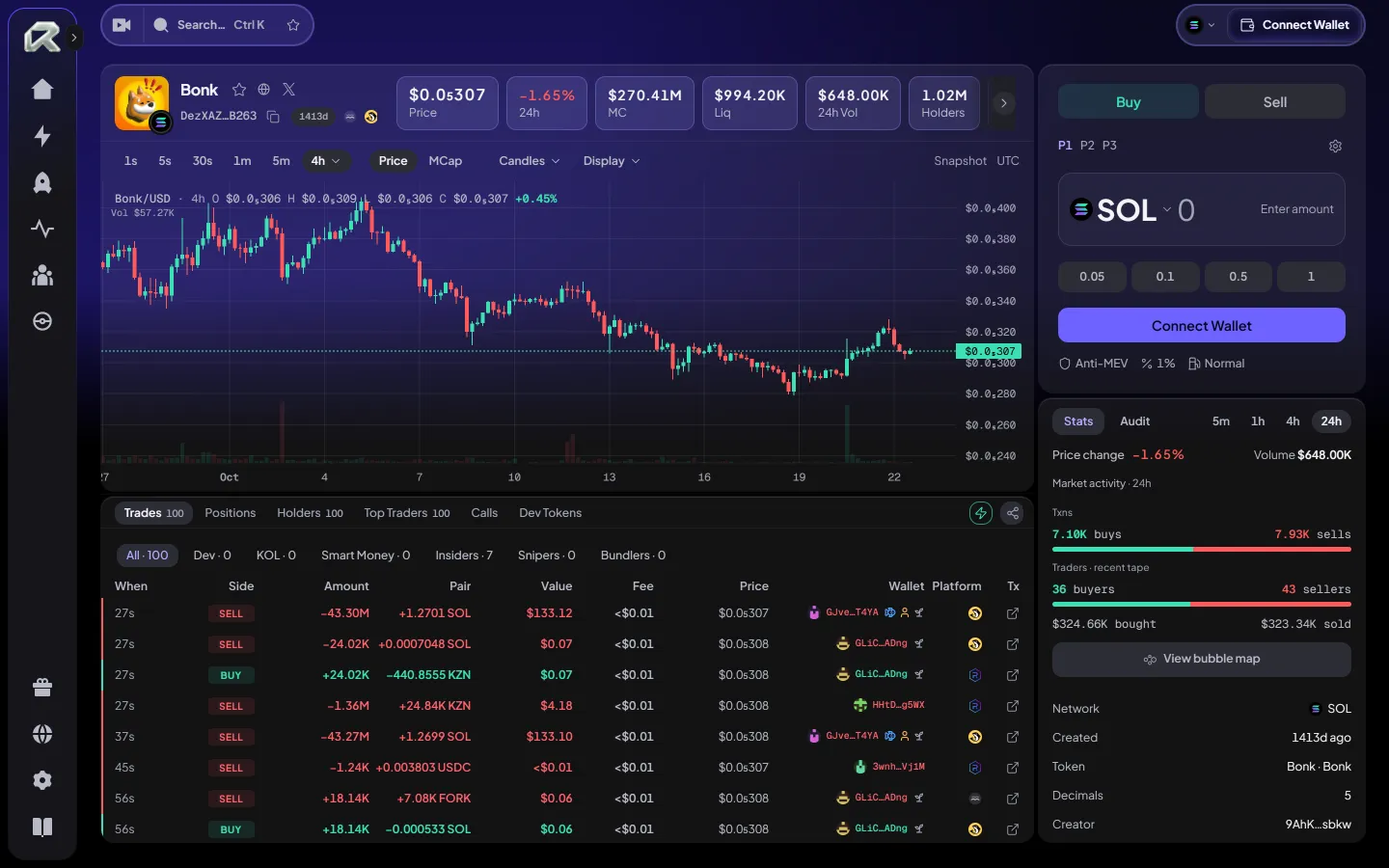
Open it from any card or row, or search with Ctrl K.
Read the market
Section titled “Read the market”| Area | What you get |
|---|---|
| Chart | Candles from 1 second up, priced in USD or by market cap |
| Trades | Every buy and sell as it lands, filterable to the developer, KOLs, smart money, insiders, snipers or bundlers |
| Holders · Top Traders | Who holds the supply and who has made the most on it |
| Dev Tokens | The other coins the same developer launched |
| Bubble map | How the largest holders are connected |
| Stats · Audit | Available volume and trader counts over the selected period, plus supported contract and holder checks; coverage varies by asset and network |
A coin still on its launch curve shows how far it is from graduation.
Place an order
Section titled “Place an order”Confirm the token’s network and contract address, then check its liquidity, holders and security information. A security check helps you assess a token; it cannot rule out every risk. See Risk disclosure.
- Choose Buy or Sell.
- Pick what you pay with, then enter an amount or tap a quick amount. The amount shows its value in USD beside it.
- Tap Buy or Sell. The order is prepared at your preset and your Wallet signs it straight away.
One tap is the default. To check every order before it is signed, turn on Settings → Confirm each trade. The panel then shows a review — what you receive, the minimum you accept, the trading and swap fees and the network fee — and the order is signed only when you choose Confirm. Either way, your slippage limit still holds on chain.
If a token cannot be traded through Rtp.Fun at that moment, the panel says so before anything is signed; try again later or choose another route.
Balances and payment assets
Section titled “Balances and payment assets”Check the actual payment asset and its network. On Robinhood Chain, the wrapped token is WETH; the separate network-fee asset is ETH. Holding WETH does not establish that you have enough ETH for gas.
A stablecoin balance that is loading or unavailable is not zero. Wait for a successful balance read before relying on a percentage or Max amount. The USD estimate uses available market data; a stablecoin’s name is not proof of a fixed $1 price.
Order settings
Section titled “Order settings”Three presets — P1, P2 and P3 — hold your amounts and settings, so a trade is one tap. Open Quick trade settings to edit them, separately for buying and selling and for Solana and EVM chains.
| Setting | What it does | Chains |
|---|---|---|
| Slippage | The most the price may move against you before the trade is refused | All |
| Priority fee | A speed level sized from recent network fees, or a fixed amount, to increase the transaction’s priority | Solana |
| Anti-MEV | Sends the trade through a protected route, with a tip you set (up to 0.1 SOL), to reduce exposure to sandwich attacks | Solana |
On EVM chains the network fee is set when the order is prepared, so there is no speed to choose.
The same presets drive Quick buy everywhere — in Pulse and in Signals. A quick buy is sent in one press, without a review.
The default Rtp.Fun fee for an aggregator-route token trade is 1.00% total: 0.65% trading + 0.35% swap. Other routes can differ. Check the selected route’s review, including network and curve or pool fees, before signing. Nothing is charged for a trade you do not send. See Fees.
After you confirm
Section titled “After you confirm”Follow the order’s status and open its transaction link to inspect the result on the explorer. If the status is Checking, wait for a final result before submitting another order. See Transaction status.
Your holdings and trading activity appear in Portfolio. To share calls with other traders, explore Alliances.
Related: Pulse · Swap · Transaction status